Promises in JavaScript are objects that represent the eventual completion (or failure) of an asynchronous operation and its resulting value. They are used to handle asynchronous tasks in a more manageable and readable way compared to traditional callback functions. A promise can be in one of three states:
- Pending: Initial state, neither fulfilled nor rejected.
- Fulfilled: The operation completed successfully.
- Rejected: The operation failed.
In this article, I will break down a piece of code step-by-step to explain how promises are created and used in JavaScript, including resolve, reject, and handling outcomes with .then() and .catch().
Code Overview
Below is the JavaScript code I wrote:
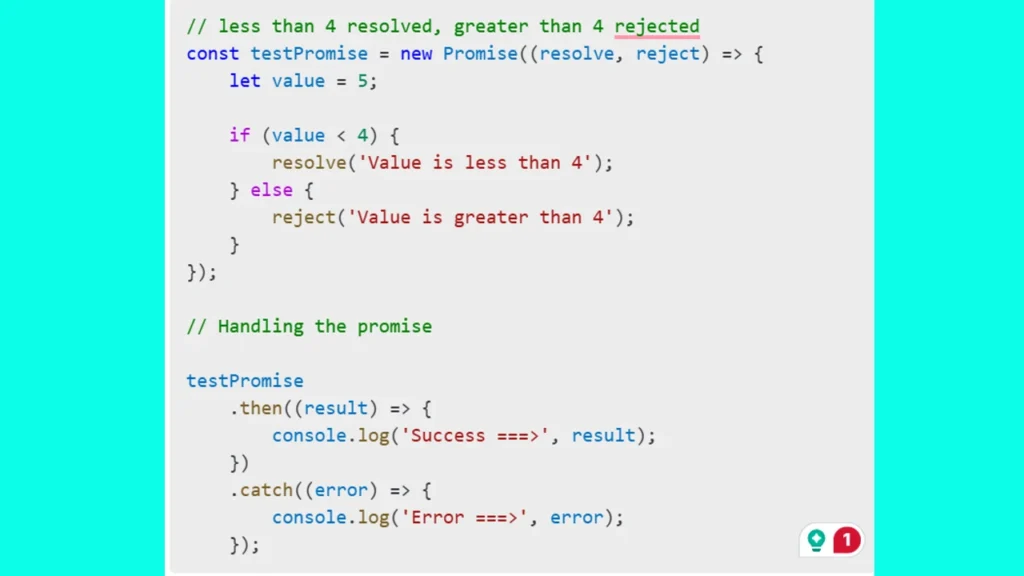
// less than 4 resolved, greater than 4 rejected
const testPromise = new Promise((resolve, reject) => {
    let value = 5;

    if (value < 4) {
        resolve('Value is less than 4');
    } else {
        reject('Value is greater than 4');
    }
});

// Handling the promise

testPromise
    .then((result) => {
        console.log('Success ===>', result);
    })
    .catch((error) => {
        console.log('Error ===>', error);
    });
Explanation
- Creating the Promise:
- The
testPromisevariable is initialized with a newPromiseobject. The constructor function forPromisetakes two parameters:resolveandreject. These functions determine whether the promise is fulfilled or rejected. - Inside the promise, I defined
let value = 5;as a test value.
- The
- Conditional Logic:
- An
if-elsestatement checks the value. Ifvalueis less than 4, theresolvefunction is called with the message'Value is less than 4', indicating the promise is fulfilled. - If
valueis 4 or greater, therejectfunction is called with the message'Value is greater than 4', indicating the promise is rejected.
- An
- Handling the Promise:
- The
.then()method is chained totestPromiseand is executed when the promise is resolved. It logs a success message to the console.
- The